Transform Any PDF into Searchable AI Data with Docling
Transform complex PDFs into RAG-ready data with Docling. Learn to build complete document processing pipelines for AI applications in just 10 lines of Python code.

What if complex research papers could be transformed into AI-searchable data using fewer than 10 lines of Python?
Financial reports, research documents, and analytical papers often contain vital tables and formulas that traditional PDF tools fail to extract properly. This results in the loss of structured data that could inform key decisions.
Docling, developed by IBM Research, is an AI-first document processing tool that preserves the relationships between text, tables, and formulas. With just three lines of code, you can convert any document into structured data.
Full version: This is a condensed version. For export options, advanced PDF processing, and chunker comparisons, see the complete tutorial.
Key Takeaways
Here’s what you’ll learn:
Convert any PDF into structured data with just 3 lines of Python code
Extract tables, formulas, and text while preserving relationships between elements
Build complete RAG pipelines that process 50 chunks in under 60 seconds
Setting Up Your Document Processing Pipeline
What is Docling?
Docling is an AI-first document processing tool developed by IBM Research. It transforms complex documents (like PDFs, Excel spreadsheets, and Word files) into structured data while preserving their original structure, including text, tables, and formulas.
To install Docling, run the following command:
pip install docling
What is RAG?
RAG (Retrieval-Augmented Generation) is an AI technique that combines document retrieval with language generation. Instead of relying solely on training data, RAG systems search through external documents to find relevant information, then use that context to generate accurate, up-to-date responses.
This process requires converting documents into structured, searchable chunks. Docling handles this conversion seamlessly.
Quick Start: Your First Document Conversion
Docling transforms any document into structured data with just three lines of code. Let’s see this in action by converting a PDF document - specifically, Docling’s own technical report from arXiv. This is a good example because it contains a lot of different types of elements, including tables, formulas, and text.
from docling.document_converter import DocumentConverter
import pandas as pd

# Initialize converter with default settings
converter = DocumentConverter()

# Convert any document format - we'll use the Docling technical report itself
source_url = "https://arxiv.org/pdf/2408.09869"
result = converter.convert(source_url)

# Access structured data immediately
doc = result.document
print(f"Successfully processed document from: {source_url}")
To iterate through each document element, we will use the doc.iterate_items() method.
from collections import defaultdict

# Create a dictionary to categorize all document elements by type
element_types = defaultdict(list)

# Iterate through all document elements and group them by label
for item, _ in doc.iterate_items():
    element_type = item.label
    element_types[element_type].append(item)

# Display the breakdown of document structure
print("Document structure breakdown:")
for element_type, items in element_types.items():
    print(f"  {element_type}: {len(items)} elements")
The output shows the different types of elements Docling extracted from the document.
Document structure breakdown:
  picture: 13 elements
  section_header: 31 elements
  text: 102 elements
  list_item: 22 elements
  code: 2 elements
  footnote: 1 elements
  caption: 3 elements
  table: 5 elements
Let’s look specifically for structured elements like tables and formulas that are crucial for RAG applications:
first_table = element_types["table"][0]
print(first_table.export_to_dataframe(doc=doc).to_markdown())
Below is a narrowed view of the extracted table, keeping selected native backend columns while omitting the pypdfium columns for readability.
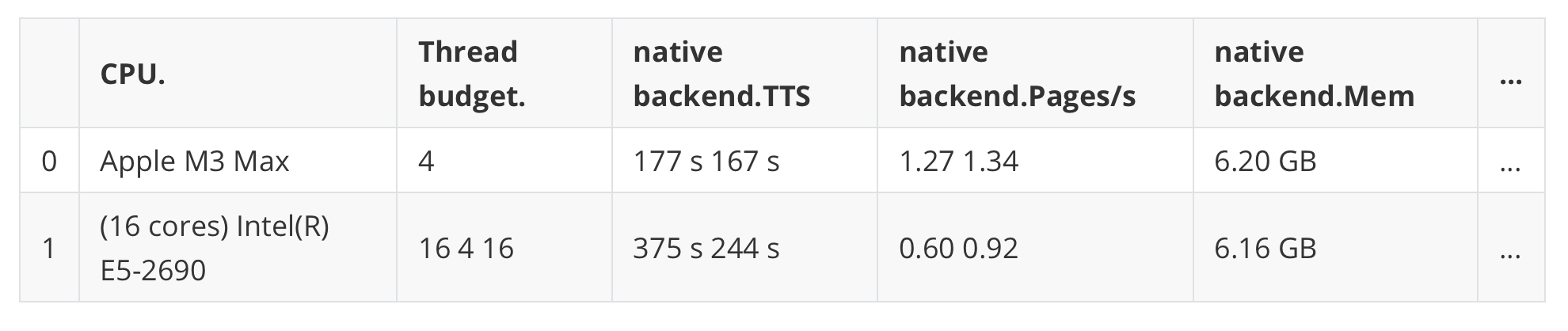
Here is how the table looks in the original PDF:
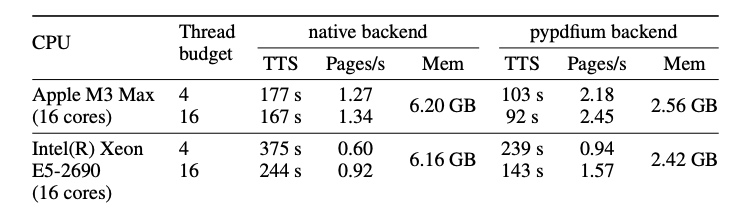
The extracted table shows Docling’s accuracy and structural differences from the original PDF. Docling captured all numerical data and text perfectly but flattened the merged cell structure into separate columns.
While this loses visual formatting, it benefits RAG applications since each row contains complete information without complex cell merging logic.
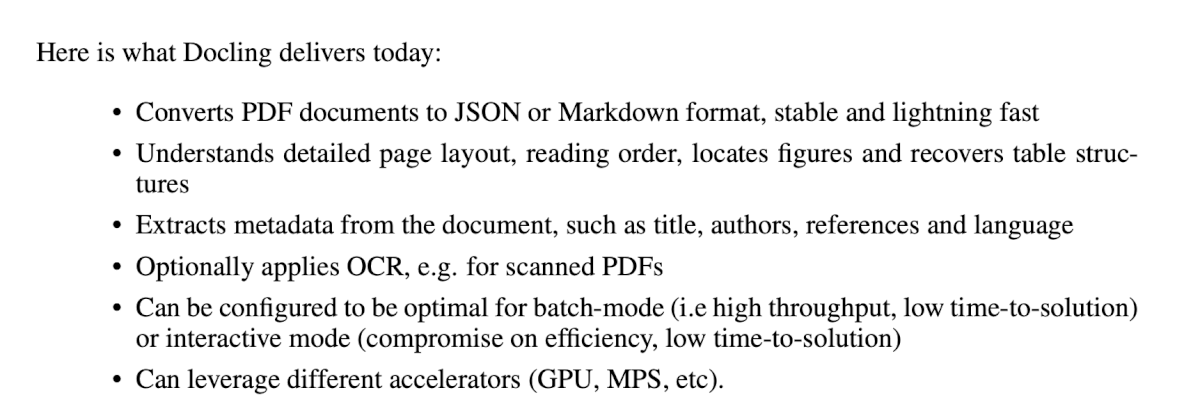
Next, look at the first list item element:
first_list_items = element_types["list_item"][0:6]
for list_item in first_list_items:
    print(list_item.text)
· Converts PDF documents to JSON or Markdown format, stable and lightning fast
· Understands detailed page layout, reading order, locates figures and recovers table structures
· Extracts metadata from the document, such as title, authors, references and language
· Optionally applies OCR, e.g. for scanned PDFs
· Can be configured to be optimal for batch-mode (i.e high throughput, low time-to-solution) or interactive mode (compromise on efficiency, low time-to-solution)
· Can leverage different accelerators (GPU, MPS, etc).
This matches the original PDF list item.
Look at the first caption element:
first_caption = element_types["caption"][0]
print(first_caption.text)
This matches the image caption in the original PDF.
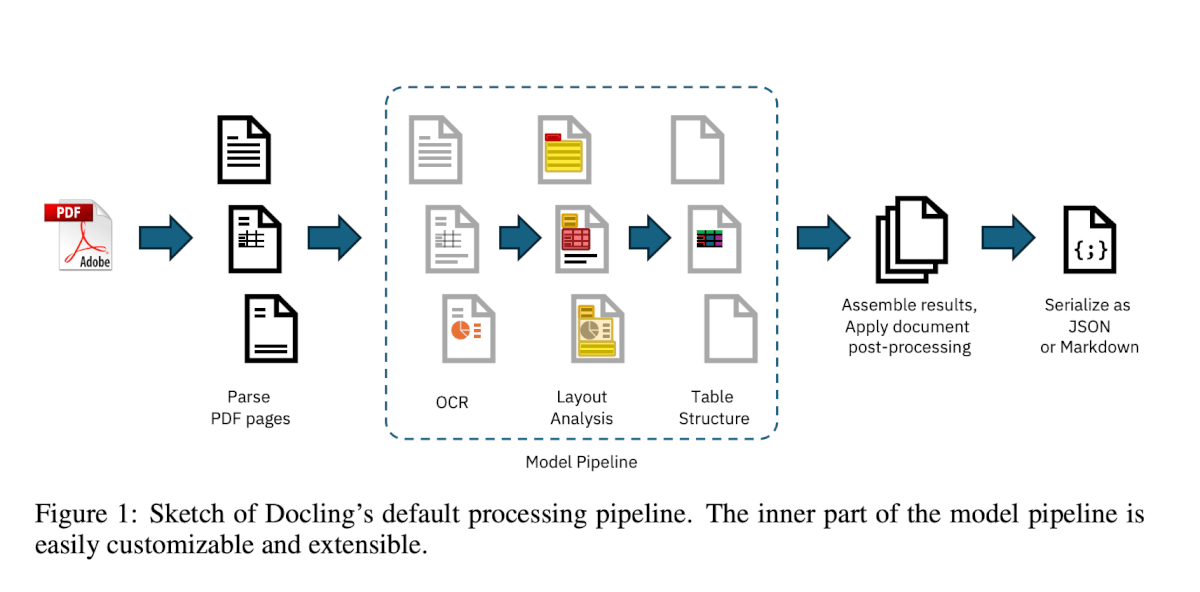
This matches the image caption in the original PDF.
Building Your RAG Pipeline
We’ll build our RAG pipeline in five steps:
Document Processing: Use Docling to convert documents into structured data
Chunking: Break documents into smaller, searchable pieces
Create Embeddings: Convert text chunks into vector representations
Store in Vector Database: Save embeddings in FAISS for fast similarity search
Query: Retrieve relevant chunks and generate contextual responses
Tools for RAG Pipelines
Building RAG pipelines requires four essential tools:
Docling: converts documents into structured data
LangChain: manages document workflows, chain orchestration, and provides embedding models
FAISS: stores and retrieves document chunks
These tools work together to create complete RAG pipelines that can process, store, and retrieve document content intelligently.
LangChain
LangChain simplifies building AI applications by providing components for document loading, text processing, and chain orchestration. It integrates seamlessly with vector stores and language models.
For a comprehensive introduction to LangChain fundamentals and local AI workflows, see our LangChain and Ollama guide.
FAISS
FAISS (Facebook AI Similarity Search) is a library for efficient similarity search in high-dimensional spaces. It enables fast retrieval of the most relevant document chunks based on embedding similarity.
For production use cases requiring robust database integration, consider implementing semantic search with pgvector in PostgreSQL or using Pinecone for cloud-based vector search as alternatives to FAISS.
Let’s install the additional packages for RAG functionality:
# Install additional packages for RAG functionality
pip install docling sentence-transformers langchain-community langchain-huggingface faiss-cpu
# Note: Use faiss-gpu if you have CUDA support
Document Processing
Convert the document into structured data using Docling.
from docling.document_converter import DocumentConverter

# Initialize converter with default settings
converter = DocumentConverter()

# Convert the document into structured data
source_url = "https://arxiv.org/pdf/2408.09869"
result = converter.convert(source_url)

# Access structured data immediately
doc = result.document
Chunking
AI models have limited context windows that can’t process entire documents at once. Chunking solves this by breaking documents into smaller, searchable pieces that fit within these constraints. This improves retrieval accuracy by finding the most relevant sections rather than entire documents.
Docling provides two main chunking strategies:
HierarchicalChunker: Focuses purely on document structure, creating chunks based on headings and sections
HybridChunker: Combines structure-aware chunking with token-based limits, preserving document hierarchy while respecting model constraints
We will use HybridChunker because it respects document boundaries (won’t split tables inappropriately) while ensuring chunks fit within embedding model constraints.
from docling.chunking import HybridChunker

# Initialize the chunker
chunker = HybridChunker(max_tokens=512, overlap_tokens=50)

# Create the chunks
rag_chunks = list(chunker.chunk(doc))

print(f"Created {len(rag_chunks)} intelligent chunks")
Created 50 intelligent chunks
Creating a Vector Store
A vector store is a database that converts text into numerical vectors called embeddings. These vectors capture semantic meaning, allowing the system to find related content even when different words are used.
When you search for “document processing,” the vector store finds chunks about “PDF parsing” or “text extraction” because their embeddings are mathematically close. This enables semantic search beyond exact keyword matching.
Create the vector store for semantic search across your document chunks:
from langchain_community.vectorstores import FAISS
from langchain_huggingface import HuggingFaceEmbeddings

# Create embeddings
embeddings = HuggingFaceEmbeddings(model_name="all-MiniLM-L6-v2")

# Create the vector store
texts = [chunk.text for chunk in rag_chunks]
vectorstore = FAISS.from_texts(texts, embeddings)

print(f"Built vector store with {len(texts)} chunks")
Built vector store with 50 chunks
Now you can search your knowledge base with semantic similarity:
# Search the knowledge base
query = "How does document processing work?"
relevant_docs = vectorstore.similarity_search(query, k=3)

print(f"Query: '{query}'")
print(f"Found {len(relevant_docs)} relevant chunks:")

for i, doc in enumerate(relevant_docs, 1):
    print(f"\nResult {i}:")
    print(f"Content: {doc.page_content[:150]}...")
Query: 'How does document processing work?'
Found 3 relevant chunks:

Result 1:
Content: Docling implements a linear pipeline of operations, which execute sequentially on each given document (see Fig. 1). Each document is first parsed by a...

Result 2:
Content: In the final pipeline stage, Docling assembles all prediction results produced on each page into a well-defined datatype that encapsulates a converted...

Result 3:
Content: Docling is designed to allow easy extension of the model library and pipelines. In the future, we plan to extend Docling with several more models, suc...
The search results show effective semantic retrieval. The vector store found relevant chunks about Docling’s architecture and design when searching for “document processing” - demonstrating how RAG systems match meaning, not just keywords.
Conclusion
This tutorial demonstrated building a robust document processing pipeline that handles complex, real-world documents. Your pipeline preserves critical elements like tables, mathematical formulas, and document structure while generating semantically meaningful chunks for retrieval-augmented generation systems.
The capability to transform any document format into AI-ready data using minimal code at no cost represents a significant advancement in document processing workflows.
For export options, advanced PDF processing, and chunker comparisons, see the complete tutorial.
Originally published on CodeCut.