Implement Semantic Search in Postgres Using pgvector and Ollama
Build semantic search in PostgreSQL with pgvector and Ollama. Store embeddings, query similar chunks, and generate RAG answers locally.

Motivation
Have you ever struggled to find information across different systems in your organization? Many organizations face this critical challenge: their valuable knowledge is scattered across different systems and formats. To find the information they need, they often have to search through multiple systems, which is time-consuming and inefficient.
pgvector brings vector search capabilities to PostgreSQL, enabling fast and accurate information retrieval using large language models (LLMs). When used in a Retrieval-Augmented Generation (RAG) setup, pgvector helps you build AI-powered search solutions that index and retrieve organizational knowledge with precision.
In this article, we’ll build a simple RAG system using pgvector and Ollama.
Full version: This is a condensed version. For the full architecture and setup walkthrough, see the complete tutorial.
Tools Used in This Article
Ollama: A lightweight, open-source model server that lets you run and interact with large language models (LLMs) on your local machine. For more information on using Ollama in private AI workflows, check out this guide.
pgvector-python: A Python library for using pgvector with SQLAlchemy, allowing you to store and query vector embeddings in PostgreSQL.
SQLAlchemy: A Python library for interacting with databases. It provides a simple interface for executing SQL queries and managing database connections.
RAG Implementation
Import Libraries
Import libraries used in this project:
import ollama
from pgvector.sqlalchemy import Vector
from sqlalchemy import text, create_engine, select, Column, Integer, Text
from sqlalchemy.orm import declarative_base, Session
import requests
from markdownify import markdownify as md
Load and Preprocess the Data
Start by downloading the article content from the specified URL and convert it to Markdown format:
# Download HTML
url = "https://codecut.ai/deep-dive-into-duckdb-data-scientists/"
resp = requests.get(url)
resp.raise_for_status()
article_html = resp.text

# Convert to Markdown
article_md = md(article_html, heading_style="ATX")
Clean the content by removing everything before the introduction and after key takeaways:
# Remove everything before the first header and after key takeaways
intro_start = "## Introduction"
key_takeaways = "## Key Takeaways"
start_idx = article_md.find(intro_start)
end_idx = article_md.find(key_takeaways)
cleaned_md = article_md[start_idx:end_idx]
Save the cleaned content to a local Markdown file:
# Save as .md
with open("deep_dive_duckdb.md", "w", encoding="utf-8") as f:
    f.write(cleaned_md)

print("Saved article as deep_dive_duckdb.md")
Connect to the Database
Use SQLAlchemy to connect to the pgvector_example database:
# Create engine
engine = create_engine("postgresql://localhost/pgvector_example")
Create the pgvector extension, which adds vector operations and similarity search capabilities to PostgreSQL:
# Create extension
with engine.connect() as conn:
    conn.execute(text("CREATE EXTENSION IF NOT EXISTS vector;"))
    conn.commit()
Split the Data into Chunks
We’ll split the data into chunks to create smaller, manageable pieces of text that can be embedded and stored in the vector database.
We specifically split by the header ‘##’ because headers naturally divide content into logical sections.
# Split the data into chunks by the header ##
chunks = cleaned_md.split('\n## ')

print(f"Number of chunks: {len(chunks)}")
print(f"First chunk: {chunks[0][:100]}")
Output:
Number of chunks: 18
First chunk: ## Introduction

Are you tired of the overhead of setting up database servers just to run SQL querie
Embed the Chunks
Text embedding is the process of converting text into numerical vectors that computers can process. Think of it like translating human language into a mathematical format that captures the meaning and context of the text.
Just as GPS coordinates pinpoint a location on Earth, embeddings create a unique numerical “address” for each piece of text in a high-dimensional space. These vectors preserve semantic relationships – similar texts will have similar vector representations.
For this project, we’ll use Ollama’s nomic-embed-text model to generate these embeddings.
# Add a prefix to the chunks
documents = ["search_document: " + chunk for chunk in chunks]

# Embed the chunks using the ollama model
document_embeddings = ollama.embed(model="nomic-embed-text", input=documents).embeddings
Let’s set up our database model and connection using SQLAlchemy by defining a Chunk model that represents how our data will be stored in the database.
# Create base class for declarative models
Base = declarative_base()

class Chunk(Base):
    __tablename__ = "chunks"

    id = Column(Integer, primary_key=True)
    content = Column(Text)
    embedding = Column(Vector(768))
Create the table in the database and set up our database connection:
# Drop the table if it exists
Base.metadata.drop_all(engine)

# Create the table in the database
Base.metadata.create_all(engine)

# Create a session to interact with the database
session = Session(engine)
Store the Chunks in the Database
Store the text chunks and their corresponding embeddings in the PostgreSQL database:
# Create chunks and add them to the session
for content, embedding in zip(chunks, document_embeddings):
    chunk = Chunk(content=content, embedding=embedding)
    session.add(chunk)

# Commit the changes
session.commit()
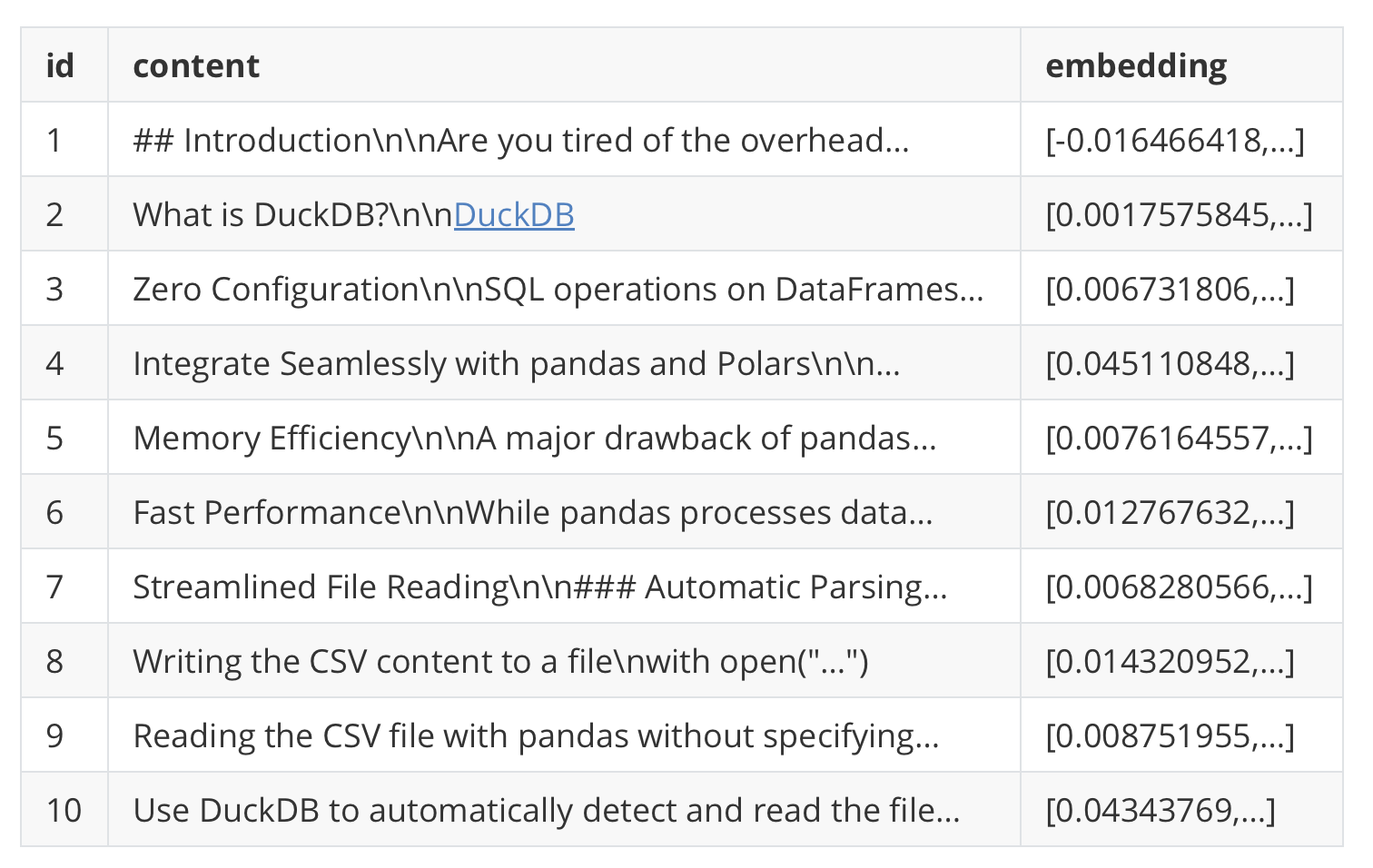
View the first 10 rows of the chunks table as a pandas DataFrame:
import pandas as pd

df = pd.read_sql_query("SELECT * FROM chunks LIMIT 10", engine)
print(df)
Output:
Query the Database
Similar to how we embedded the chunks, we’ll embed the query so that computers can understand it.
query = "What is DuckDB?"
input_query = 'search_query: ' + query
query_embedding = ollama.embed(model='nomic-embed-text', input=input_query).embeddings[0]
Now we are ready to retrieve the most similar chunks. We’ll use the l2_distance function (also known as Euclidean distance) to find the closest chunks to the query.
This function measures the straight-line distance between two vectors in n-dimensional space, where n is the dimension of our embeddings (768 in this case). The smaller the distance, the more similar the vectors are.
# Retrieve the most similar chunks
results = session.scalars(
    select(Chunk).order_by(Chunk.embedding.l2_distance(query_embedding)).limit(5)
).all()

# Join the results into a single string
context = "\n\n".join([f"{i+1}. {row.content}" for i, row in enumerate(results)])
Let’s print the first 100 characters of the context for each chunk:
for i, result in enumerate(results):
    print(f"{i+1}. {result.content[:100]}\n")
Output:
1. What is DuckDB?

[DuckDB](https://github.com/duckdb/duckdb) is a fast, in-process SQL OLAP database

2. ## Introduction

Are you tired of the overhead of setting up database servers just to run SQL querie

3. Use DuckDB to automatically detect and read the CSV structure
result = duckdb.query("SELECT * FROM r

4. Fast Performance

While pandas processes data sequentially row-by-row, DuckDB uses a vectorized exec

5. Reading Multiple Files

### Reading Multiple Files from a Directory

It can be complicated to read m
We can see that the context is a list of chunks that are similar to the query ordered by similarity.
Generate a Response
Now, we are ready to use the context to generate a response to the query. We’ll use the llama3.2 model to generate the response.
prompt = f'Answer this question using only the following context: {context}\n\n{query}'
response = ollama.generate(model='llama3.2', prompt=prompt).response
print(f"Query: {query}")
print(f"Response: {response}")
Output:
Query: What is DuckDB?
Response: DuckDB is a fast, in-process SQL OLAP database optimized for analytics. It offers several key features that make it an attractive option for data scientists, including:

1. Zero Configuration: No need to set up or maintain a separate database server.
2. Memory Efficiency: Process large datasets without loading everything into memory.
3. Familiar Interface: Use SQL syntax you already know, directly in Python.
4. Performance: Faster than pandas for many operations, especially joins and aggregations.
5. File Format Support: Direct querying of CSV, Parquet, and other file formats.

DuckDB provides a streamlined approach to data querying without the overhead of setting up database servers. It significantly outperforms pandas in terms of both performance and memory efficiency, especially when handling complex operations like joins and aggregations on large datasets.
The response is accurate and relevant to the query!
Next Steps
This is a simple example of how to use pgvector to create a RAG system. There are many ways to improve this example. Here are some ideas:
Replace the article with your own content and ask custom questions.
Try different embedding models or distance functions (e.g., cosine_distance).
Experiment with chunk sizes and splitting strategies.
That’s it for this example! I hope you found it helpful.
For the full architecture and setup walkthrough, see the complete tutorial.
Related Resources
For deeper exploration of RAG systems and vector databases:
Vector Database Alternatives: Pinecone and Ollama guide for cloud-based vector search solutions
RAG System Evaluation: MLflow RAG evaluation guide for quality metrics and performance tracking
Document Processing: Docling PDF processing guide for advanced PDF parsing in RAG pipelines
Originally published on CodeCut.