Automate Model Tuning with an Agentic Training Loop
Build an agentic training loop that automates model tuning, tests candidate edits, and keeps only changes that improve validation loss.

The Problem with Hand-Tuning a Model
Model-tuning experiments often follow a repeatable pattern: change the code, train the model, compare the validation score, and decide what to try next.
Doing this by hand is slow because every iteration needs human attention. If the steps are this predictable, could the loop be automated?
This article shows how to automate model tuning with an agent. The agent proposes changes to the training script, a fixed evaluation step checks whether each change improves the metric, and only better versions are kept.
If you are tuning prompts instead of training code, my DSPy auto-optimization guide shows how DSPy automates that process with a metric-driven loop.
By the end, you will have a loop that tests training changes automatically, so experiments can keep running while you work on something else.
What We’re Building
This article builds the loop around nanoGPT, a compact GPT implementation for small language-model experiments. Its training code is lightweight, which makes it a good fit for repeated agent edits and quick evaluations.
To build the loop, we first set up the parts that stay stable:
Start with a small training script that is fast enough to run many times.
Use the same validation data and metrics for every candidate, so improvements are easy to compare.
Then we repeat the improvement loop:
Let the agent propose one candidate change to the training script.
Train the candidate and measure it with the same validation setup.
Make the candidate the new starting point only if it improves the metric.
Put together, the loop looks like this:
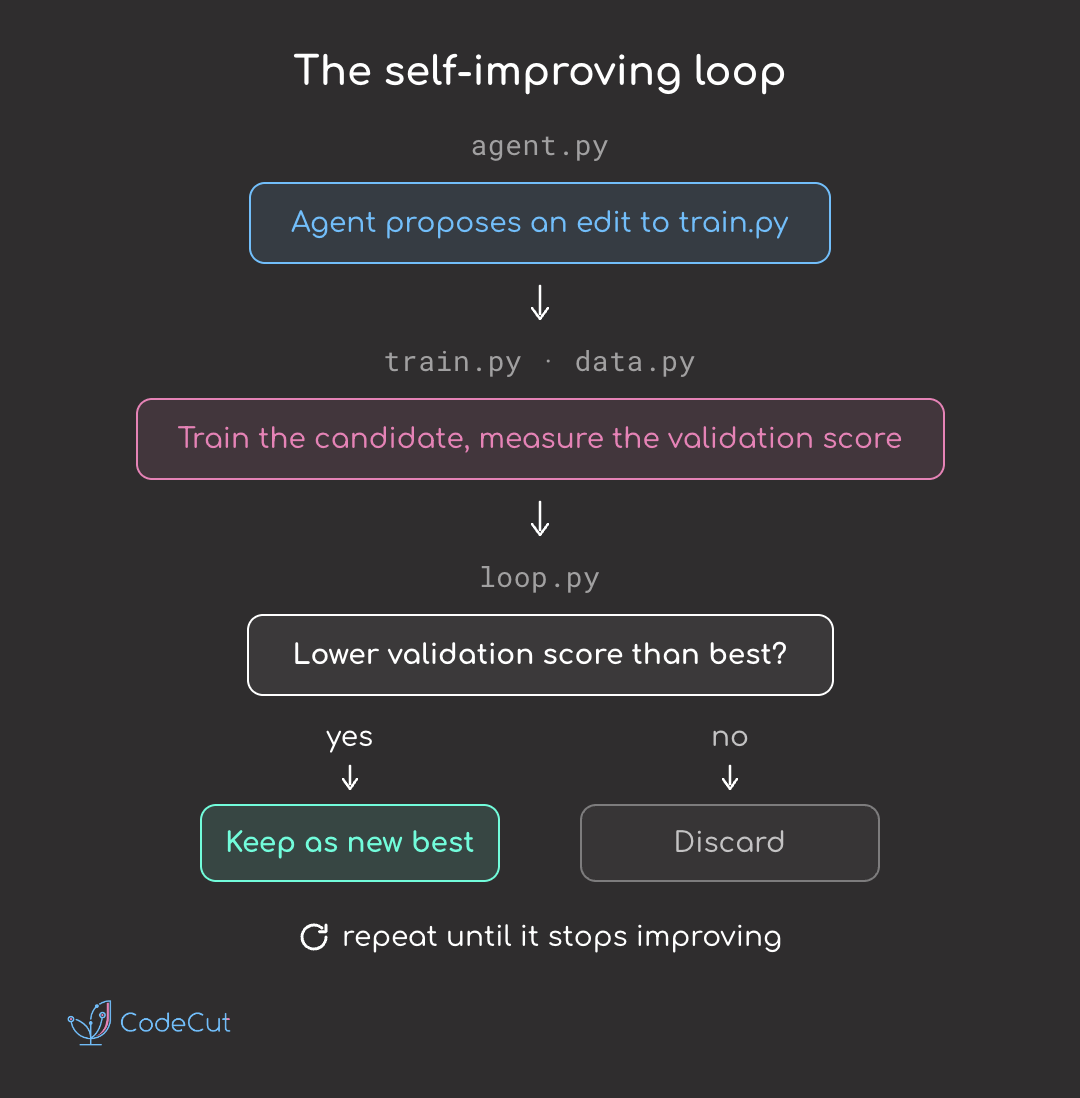
The runnable version of this loop lives in the companion repo: khuyentran1401/agent-tune. The article focuses on the design, while the repo provides the full nanoGPT example, templates, backend options, and CLI.
Define the Evaluation Code
The data.py file is the stable evaluation file. It loads the text, samples validation batches, reports the final score, and is not modified by the agent.
It exposes two things the training script relies on:
# data.py gives the training script two fixed things:
def get_batch(split, batch_size):
    ...
    return inputs, targets               # a batch of inputs and next-char targets

def evaluate(model):
    ...
    print(f"val_loss {val_loss:.4f}")    # the format the loop parses
In the code above:
get_batchgives the training script consistent training and validation data.evaluatecomputes the validation score and prints it in a format the loop can read.
See the full implementation in examples/nanogpt/data.py.
Define the Editable Training Script
The train.py file is the editable training script. It contains the model, optimizer, hyperparameters, and training loop that define each candidate:
# train.py: the agent may rewrite anything here.
N_LAYER, N_HEAD, N_EMBD = 4, 4, 128
BATCH_SIZE, LR, MAX_ITERS = 32, 1e-3, 300

model = GPT()
optimizer = torch.optim.AdamW(model.parameters(), lr=LR)
for _ in range(MAX_ITERS):
    ...                                    # train the model
data.evaluate(model)                       # prints val_loss for the loop
In the code above:
The constants define the model and training settings the agent can tune.
The script trains the candidate model, then calls
data.evaluateto report the score.
See the full implementation in examples/nanogpt/train.py.
Run the current training script to get the baseline score.
python train.py
val_loss 2.1321
Define the Agent Interface
The agent interface in agent.py is the bridge between the loop and the language model. It sends the current train.py and the best score so far to the model, then expects a rewritten training script in return.
The main function in that interface is propose_edit, which has three steps:
def propose_edit(code, best, config):
    prompt = build_prompt(code, best, config)   # assemble the instruction shown below
    reply = ask_model(prompt, config)           # send it to the configured model
    return extract_code_block(reply)            # extract the rewritten train.py
In the code above:
build_promptcreates the prompt from the metric to improve and the current training script.ask_modelsends that prompt to the configured backend, such as Ollama, OpenAI, or Anthropic, and receives the model’s response.extract_code_blockextracts the rewritten script from that response so the loop can test it.
If you want more context on local model backends, my LangChain and Ollama guide shows how Ollama can run private AI workflows without sending data to a cloud API.
The prompt includes the current training script and asks for a complete rewrite:
Current best {metric} is {best} ({goal_word}).

Here is the current {editable}, between markers:

<{editable}>
{code}
</{editable}>

Propose ONE change to improve {metric}.
{instructions}

Return the COMPLETE rewritten {editable} in a single fenced code block and nothing else.
See the backend implementation in agent_tune/agent.py.
Define the Safety Checks
This step is implemented in loop.py. It lets the system test agent-generated code without constant supervision: each candidate is tried, scored, and either accepted or rolled back.
run_loop is the function that coordinates that process:
def run_loop(config):
    # Start from the current editable file and its baseline score.
    editable_path = get_editable_path(config)
    best_code = read_script(editable_path)
    best_score = run_and_measure(config)

    # Run the improvement cycle for the configured number of steps.
    for step in range(config.iterations):
        # Ask the agent to propose one edit to the current best code.
        candidate_code = propose_edit(best_code, best_score, config)
        if candidate_code is None:
            continue

        # Temporarily replace the file so the run command scores the candidate.
        write_script(editable_path, candidate_code)

        # Run the candidate and parse the metric from its output.
        candidate_score = run_and_measure(config)

        # If the candidate improved, remember it as the new best.
        if is_better(candidate_score, best_score, config.goal):
            best_score, best_code = candidate_score, candidate_code
        # Otherwise, restore the previous best.
        else:
            write_script(editable_path, best_code)

    # Leave the editable file as the best version found.
    write_script(editable_path, best_code)
Running the repo prints one line per step:
baseline val_loss 2.1321
step 0: val_loss None [discard] (best 2.1321)
step 1: val_loss None [discard] (best 2.1321)
step 2: val_loss 2.8146 [discard] (best 2.1321)
step 3: val_loss 1.8189 [keep] (best 1.8189)
The run starts with a baseline val_loss of 2.1321, measured before any agent edits. Every candidate is compared against the current best:
Steps 0 and 1 have
val_loss None, so neither candidate can replace the baseline.Step 2 has
val_loss 2.8146, which is higher than2.1321, so it is discarded.Step 3 lowers
val_lossto1.8189, so it becomes the new best version.
See the full loop implementation in agent_tune/loop.py.
Final Thoughts
This article showed how to turn manual tuning into a propose-evaluate-keep loop: keep the evaluation stable, let the agent edit one file, and carry forward only candidates that improve the score.
This approach works best when the task has a clear metric, a focused editable file, and fast enough iterations to explore multiple candidates. Examples include tuning small models, optimizing prompts, adjusting hyperparameters, searching over simulation constants, or improving scripts that report one score.
It is not a good fit when each run is costly, the output needs human judgment, or a single metric would hide important correctness or safety issues.
Related Tutorials
Structured Output Tools for LLMs: Compares tools for making LLM responses easier to parse and validate.
Build Production-Ready LLM Agents with LangChain 1.0 Middleware: Shows how to add stronger safeguards around agent behavior.
Originally published on CodeCut.